implementing AdSense for search on blogger beta pages. Please regenerate
the code from inside your AdSense account and add the code to the
HTML/Javascript page element." I have tested it with a number of beta blogs, including this one, and it does work. So this hack is no more necessary.
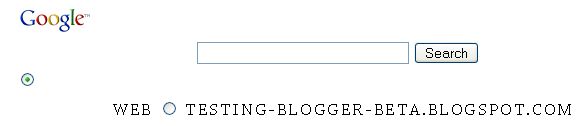
Someone complained of some problem when putting Google AdSense SearchBox into a Blogger Beta blog. It seem the button gets misplaced and the script gets changed. So I am adding the SearchBox to this blog Guide to Malaysia to see how it goes. I put one in the left sidebar. You can see it on the site itself now, but I will probably be changing or removing it later, so I am putting a screenshot (Internet Explorer) of it below for posterity:

Here is how the Google SearchBox look in FireFox (note that the text extend into the main column):

I have put another one at the footer of the blog, which you would also be able to observe now, and which I will also likely be changing or removing later. So, here is the screenshot:
Observation
The button for the WebSearch seem to have been displaced, more so for the one in the footer. The displacement for the one in the sidebar may be to take into consideration the narrowness of the sidebar. I don't know. The search box not only look ugly, it also does not work. Try typing some search terms into the search box. For some unknown reasons, however many times I click on the CAPS LOCK key, the search terms I type in are in upper case letter. And worst, when I click on SEARCH, nothing happens.
Changes to the scripts
The scripts also have been rearranged by Blogger. Other than rearrangement, I haven't spotted any change yet, but that may be because I didn't look hard enough, and the scripts are difficult to compare because of the rearrangement. Anyway, I paste below the scripts for you to see.
Scripts from Google for the sidebar
| <!-- SiteSearch Google --> <form method="get" action="http://www.google.com/custom" target="google_window"> <table border="0" bgcolor="#ffffff"> <tr><td nowrap="nowrap" valign="top" align="left" height="32"> <a href="http://www.google.com/"> <img src="http://www.google.com/logos/Logo_25wht.gif" border="0" alt="Google" align="middle"></img></a> </td> <td nowrap="nowrap"> <input type="hidden" name="domains" value="testing-blogger-beta.blogspot.com"></input> <input type="text" name="q" size="31" maxlength="255" value=""></input> <input type="submit" name="sa" value="Search"></input> </td></tr> <tr> <td> </td> <td nowrap="nowrap"> <table> <tr> <td> <input type="radio" name="sitesearch" value="" checked="checked"></input> <font size="-1" color="#000000">Web</font> </td> <td> <input type="radio" name="sitesearch" value="testing-blogger-beta.blogspot.com"></input> <font size="-1" color="#000000">testing-blogger-beta.blogspot.com</font> </td> </tr> </table> <input type="hidden" name="client" value="pub-9408074091704638"></input> <input type="hidden" name="forid" value="1"></input> <input type="hidden" name="channel" value="9774846827"></input> <input type="hidden" name="ie" value="ISO-8859-1"></input> <input type="hidden" name="oe" value="ISO-8859-1"></input> <input type="hidden" name="cof" value="GALT:#008000;GL:1;DIV:#336699;VLC:663399;AH:center;BGC:FFFFFF;LBGC:336699;ALC:0000FF;LC:0000FF;T:000000;GFNT:0000FF;GIMP:0000FF;FORID:1"></input> <input type="hidden" name="hl" value="en"></input> </td></tr></table> </form> <!-- SiteSearch Google --> |
Script obtained from source code of blog
| <!-- SiteSearch Google --> <form action="http://www.google.com/custom" target="google_window" method="get"> <table border="0" bgcolor="#ffffff"> <tr><td nowrap="nowrap" valign="top" height="32" align="left"> <a href="http://www.google.com/"> <img border="0" alt="Google" src="http://www.google.com/logos/Logo_25wht.gif" align="middle"/></a></td></tr></table></form> <td nowrap="nowrap"> <input value="testing-blogger-beta.blogspot.com" name="domains" type="hidden"/></td> <input maxlength="255" value="" name="q" size="31" type="text"/> <input value="Search" name="sa" type="submit"/> <tr> <td> </td> <td nowrap="nowrap"> <table> <tr> <td> <input checked="checked" value="" name="sitesearch" type="radio"/></td></tr></table></td></tr> <font color="#000000" size="-1">Web</font> <td> <input value="testing-blogger-beta.blogspot.com" name="sitesearch" type="radio"/></td> <font color="#000000" size="-1">testing-blogger-beta.blogspot.com</font> <input value="pub-9408074091704638" name="client" type="hidden"/> <input value="1" name="forid" type="hidden"/> <input value="9774846827" name="channel" type="hidden"/> <input value="ISO-8859-1" name="ie" type="hidden"/> <input value="ISO-8859-1" name="oe" type="hidden"/> <input value="GALT:#008000;GL:1;DIV:#336699;VLC:663399;AH:center;BGC:FFFFFF;LBGC:336699;ALC:0000FF;LC:0000FF;T:000000;GFNT:0000FF;GIMP:0000FF;FORID:1" name="cof" type="hidden"/> <input value="en" name="hl" type="hidden"/> <!-- SiteSearch Google --> |
UPDATE: AdSense Help advised to add the script direct into the template, but didn't gave instruction how. I did some trial and error, and succeeded in adding a working searchbox in this blog: Star Home Improvements. The searchbox in the first blog Guide to Malaysia should also be working as I have updated it.
How to put a working AdSense SearchBox in a Blogger Beta blog
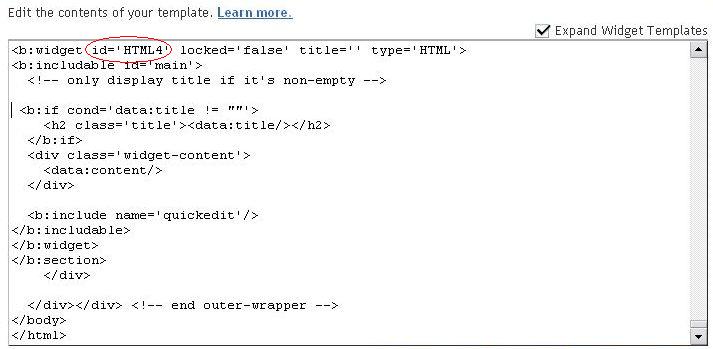
I first tried adding a blank Page Element in the Layout, but got the error message "Required field must not be blank". Next I tried to add a Page Element again, (HTML or JavaScript), but this time, I added <!-- Google SiteSearch Box --> to the page element editor, and saved. This time, the Page Element saved successfully. There were 3 other HTML widget before I added the widget I want to use for the searchbar, so the widget should be widget no. 4 I then right-clicked on View Blog and selected "open in new tab". In that site, at the menu bar, I clicked "View Source" and looked for in the source code. I found it at the bottom (click on screenshot to enlarge it and note the HTML4 circled in red):
I then opened the template editor (with the "Expand widget template" ticked) and searched for the section which contain the term HTML4. I found it towards the bottom of the template. See screenshot (click on image to enlarge it):
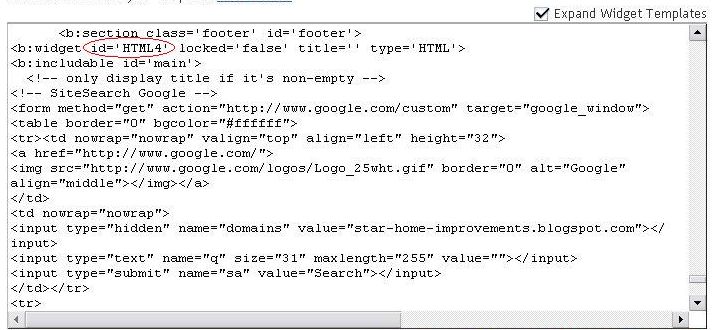
As you can see, I added the AdSense searchbox script after HTML4 and after the comment tag. I previewed, the searchbox appeared OK, I saved and got a working SearchBox in the footer. Only thing is, I distinctly remembered clicking the search star-home-improvements.blogspot.com when generating the script, but in the resulting SearchBox, the search Web got ticked instead. Also, when I examine the original script generated by AdSense, and the script I see in the source code, the script have been rearranged again, and I see some changes. Hopefully, this will not lead to us going against the AdSense TOS. Anyway, I'll write to AdSense Help and post an update here later.
UPDATE 2 November 2006: The problem regarding the radio button for the Websearch being displaced have been rectified, so now you will get a properly presented working searchbox.
Footnote: I should have made the title Testing adding or Google AdSense SearchBox for Blogger beta instead of what you see in the title now. The post title is important for search engines and doing this may help those using Blogger Beta trying to find information on how to add a working Google AdSense search box to find this post. This post is already indexed by the search engine. Changing the title will cause the URL to this post (permalink) to change, and that means whatever links I get in the search engine result page will become dead link. Additional information for those thinking of changing their post title.
